Encrypt and Share Files With Gpg
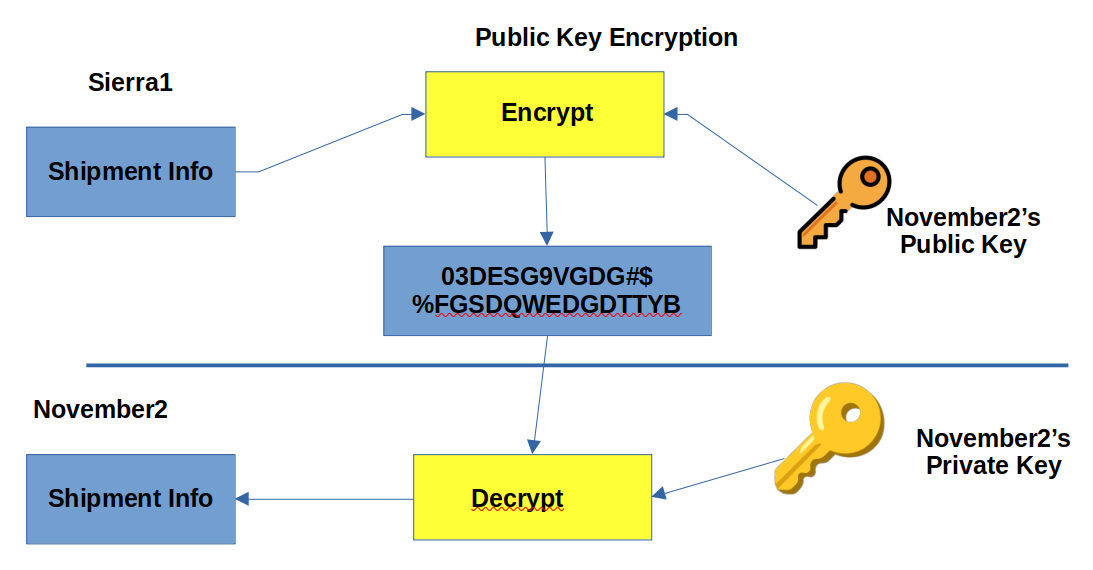
Today, we will look at encrypting and sharing files securely using gpg. GnuPG (GPG) is a tool used to encrypt data and create digital signatures.
For our exercise, we will consider two users on two different linux systems. They are running a mustard smuggling operations out of an undisclosed location and need to share information securely, to avoid any interception by Mustardpol. 😉
User1 : sierra1 with email sierra1@mustardops.org User2 : november2 with email november2@mustardops.org
The workflow goes as follows:
sierra1 wants to send details of the next shipment of mustard to november2. Both these guys needs to create their own key pairs (public and private) on their respecive systems. Once the key pairs have been generated, they will share their repective public keys with each other. (We will assume that they can do so by using rsync). Sharing public keys can be done via open communication channels like email, but there should be a mechanism by which you have the assurance that the public key does belong to the person with whom you wish to share information with.
The private keys, however should never be shared and should be stored securely.
User1 and User2 generates their own key pairs with the following command:
gpg --full-generate-key
They answer the prompts generated by gpg and end up with their key pair. We can list our key pairs with:
gpg --list-public-keys
gpg --list-secret-keys # displays the private keys
Public Key Listing (User1)

Private Key Listing (User1)

The same comands as above will be executed by User2, substituting the name and email address parameters.
Public Ket Listing (User2)

Private Key Listing (User2)

They will now need to export their public keys into a file and share those with each other. This is done with the fillowing command:
gpg --export -o sierra1.key 68A14F32098A4698C1DF53C631E2FFFE296EA030
# the last paramater is the key ID which is displayed when we list the kseys with the -list-keys option above
Now that they have shared their public keys with each other, they need to import the public keys into their respective system’s public keyring with the following command.
gpg --import sierra1.key # User2 will execute this command on his system
gpg --import november2.key ## User1 will execute this command on his system
The next step will be encrypting files and sending them to the recipeint. Lets say that User1 want to send a text file mustard_shipments.txt to User2. He will do so with the follwing command:
gpg -e -r november2@mustardops.org mustard_shipments.txt
This command will create a file named mustard_shipments.txt.gpg, which can be send to the recipient. The recipient can now decrypt the file with the following command:
gpg -d mustard_shipments.txt.gpg
## store the decrypted data in shipment.txt
gpg -d -o shipment.txt  mustard_shipments.txt.gpg
We can use gpg to encrypt a file with gpg -c file_to_be_encrypted.txt. You will be prompted for a password during the encryption process. This command will create an encrypted file named file_to_be_encrypted.txt.gpg.
⚠️ If the file you are encrypting contains really sensitive data, you should erase the original file securely once it hs been encrypted.
To decrypt the file use gpg -d file_to_be_encrypted.txt.gpg
You can delete a user’s GPG Keys from your system with the following command(s):
gpg --delete-secret-key november2@mustardops.org
pg --delete-key november2@mustardops.org